




Use Agent Templates
Use Agent Templates
Agent templates are prebuilt personal Agents with instructions already written for common tasks. Instead of creating an agent from scratch, you can start with a template and customize its instructions at any time.
Expensify includes a growing library of built-in templates, each designed for a specific workflow. This article explains what each template does and when you might want to use it.
How agent templates work
Every template is a standard Expensify agent with instructions that are already written for you. Like any agent, it runs from its own Expensify account and is added as a full-access Copilot on your account, allowing it to review expenses and act on your behalf.
Each template monitors your expenses and receipts for specific conditions. When those conditions are met, the agent performs its configured action, such as adding a comment or moving an expense to another report. If an expense doesn’t match the template’s instructions, the agent takes no action.
When you create an agent from a template, you can edit its instructions at any time to customize its behavior.
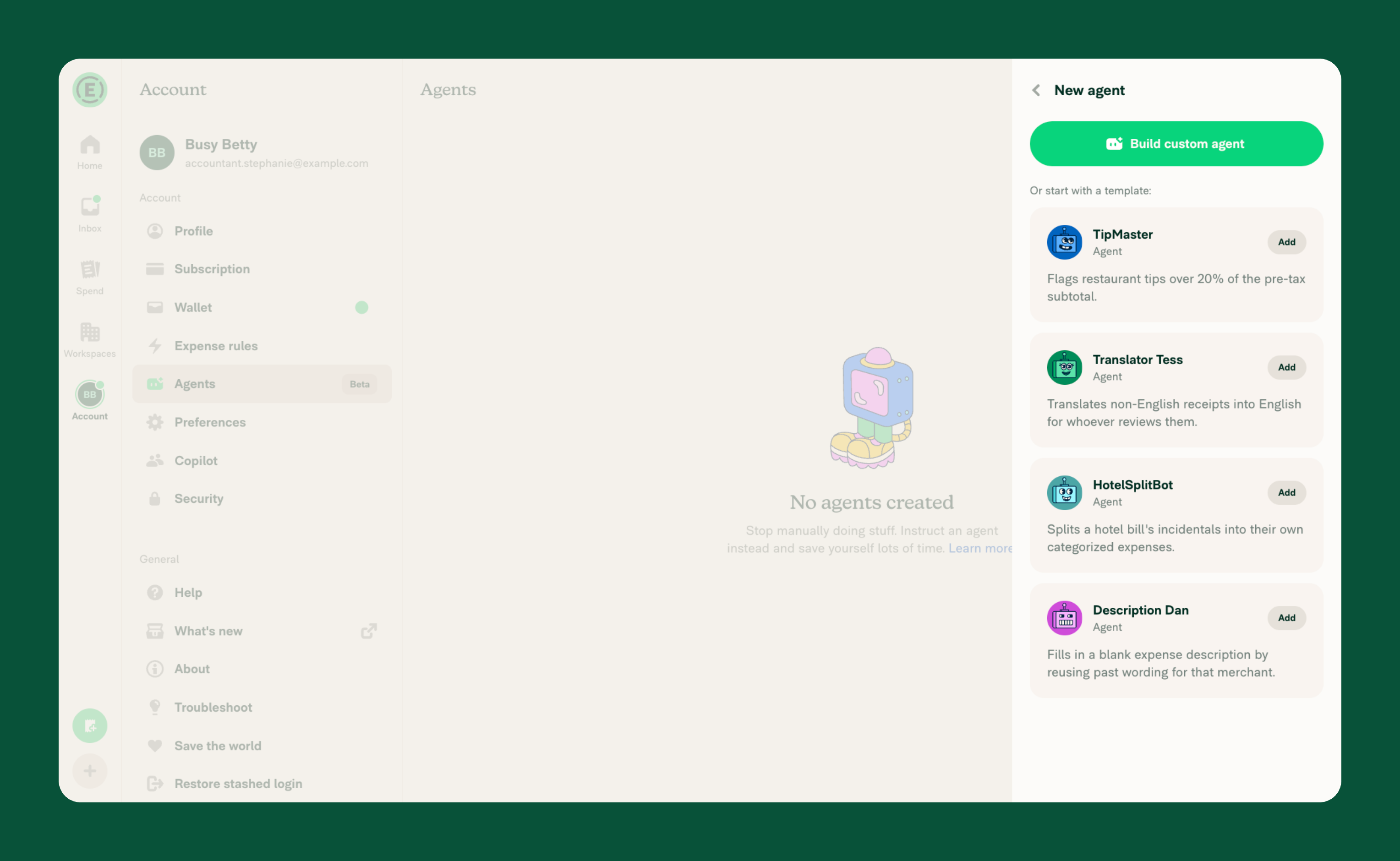
What TipMaster does
TipMaster flags restaurant receipts where the tip exceeds 20%.
When you add a restaurant receipt, TipMaster calculates the tip percentage using the pre-tax subtotal. If the tip is greater than 20%, it adds a comment showing the subtotal, tip amount, and calculated percentage. It ignores receipts that aren’t from restaurants and tips that are 20% or less.
TipMaster is useful for maintaining consistent meal spending, identifying accidental over-tipping, or highlighting expenses that may need additional review.
What Translator Tess does
Translator Tess translates receipts that aren’t written in English.
When you add a receipt in another language, Translator Tess comments with an English translation of the receipt’s key details, including the merchant, date, line items, subtotal, tax, and total. Receipts that are already in English are ignored.
Translator Tess is useful for international travel, reviewing foreign-language receipts, or keeping expense documentation consistent across global teams.
What HotelSplitBot does
HotelSplitBot itemizes hotel expenses so each charge can have its own category.
When a hotel receipt includes separate charges, such as the room, meals, parking, or laundry, HotelSplitBot splits them into individual expenses while keeping the room charge as its own expense. The split amounts add up to the original expense total. Hotel expenses that only include a room charge or have already been split aren’t changed.
HotelSplitBot is useful for itemizing hotel stays and categorizing room charges and incidentals separately.
What Description Dan Does
Description Dan automatically adds descriptions to expenses based on descriptions you’ve previously used for the same merchant.
When an expense has no description, Description Dan looks at your past expenses from that merchant. If the same description has been used repeatedly, it adds that description to the new expense. Expenses that already have a manually entered description aren’t changed.
Description Dan is useful for recurring purchases where you typically use the same description, helping keep expense details consistent without entering them manually each time.


